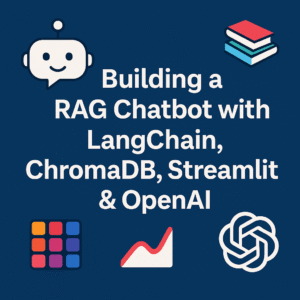
Building a RAG Chatbot with LangChain, ChromaDB, Streamlit & OpenAI
 rjshk013
December 11, 2025
rjshk013
December 11, 2025
MLOPS Project Series-PART 2
Powered by OpenAI Embeddings + GPT, using my rag-chatbot-langchain repo
Large Language Models are powerful, but out of the box they don’t know anything about your PDFs, playbooks, or eBooks. That’s where Retrieval-Augmented Generation (RAG) comes in.
In this project, I built a document-aware chatbot that can answer questions based on any PDFs you drop into a folder — using:
- LangChain for orchestration
- ChromaDB as a vector store
- OpenAI Embeddings + Chat Models for intelligence
- Streamlit for the UI
- Docker for easy deployment
The complete implementation lives here:
👉 https://github.com/rjshk013/mlops-project/tree/master/rag-chatbot-langchain
This article explains how it works and gives you a step-by-step guide to run it from my repo.
⚠️ Important: This Project Uses OpenAI Only (Not HuggingFace)
The current codebase is built specifically for OpenAI, not HuggingFace.
Concretely:
- Embeddings are generated via:
from langchain_openai import OpenAIEmbeddings embeddings = OpenAIEmbeddings()- The LLM answering your questions uses:
from langchain_openai import ChatOpenAI llm = ChatOpenAI(model="gpt-3.5-turbo", temperature=0.7)
👉 This means:
- You must have a valid OpenAI account
- You must generate an OpenAI API key
- You must set
OPENAI_API_KEYin a.envfile (or environment variable) - OpenAI will charge you per API usage (embeddings + chat)
There is no HuggingFace / local LLM integration in this version. If you remove the API key, the app will fail with authentication or quota errors.
🏗️ High-Level Architecture
Here’s what happens under the hood:
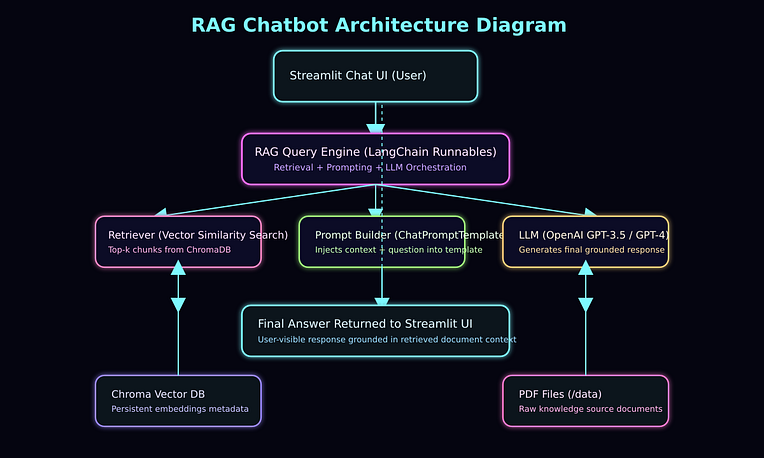
- You place PDFs into the
data/folder - The app:
- Loads the PDFs
- Splits them into overlapping text chunks
- Calls OpenAI Embeddings API to embed each chunk
- Stores embeddings + metadata in ChromaDB (local folder
chroma_db/
- When you ask a question:
- ChromaDB retrieves the most relevant chunks
- LangChain builds a RAG prompt using those chunks as context
- ChatOpenAI (GPT model) generates the final answer
- Streamlit displays the response in a chat UI
It’s a classic RAG loop: Retrieve → Augment → Generate.
🧱 Project Structure (From the Repo)
Inside mlops-project/rag-chatbot-langchain:
rag-chatbot-langchain/
│── chatbot.py               # Streamlit app (RAG chatbot)
│── ingest_database.py       # Optional batch ingestion script
│── requirements.txt         # Python dependencies
│── Dockerfile               # Image definition
│── docker-compose.yml       # Orchestration
│── data/                    # Put your PDFs here
│── chroma_db/               # Chroma vector DB (auto-created)
│── .env                     # OpenAI API key (you create this)
└── README.md
🔑 OpenAI Requirement: Why We Need the API Key
Two core parts of the pipeline depend on OpenAI:
- Embeddings during ingestion
OpenAIEmbeddings()calls the embeddings API for each chunk
- LLM during question answering
ChatOpenAI()calls the chat/completions API to generate response
That’s why the .env must include:
OPENAI_API_KEY=sk-...
And why OpenAI asks for payment:
Every embedding + chat request uses compute on their GPU clusters, so they charge per token to cover infra costs.
🚀 Step-by-Step: How to Run This Project from My Repo
Here’s a clean, ordered guide to run this from scratch.
✅ Prerequisites
- OpenAI Account with billing enabled
- OpenAI API Key from:
https://platform.openai.com/api-keys - Git installed
- EITHER:
- Docker + Docker Compose (recommended), or
- Python 3.10+ with
pip
1️⃣ Clone the Repository
git clone https://github.com/rjshk013/mlops-project.git
cd mlops-project/rag-chatbot-langchain
2️⃣ Create .env with Your OpenAI API Key
In the rag-chatbot-langchain directory, create a file named .env:
nano .env
Add:
OPENAI_API_KEY=sk-your-key-here
🔐 Keep this file private. Don’t commit it to GitHub.
3️⃣ Add Your PDF Documents
Put one or more PDFs into the data/ folder:
mkdir -p data
cp /path/to/your-documents/*.pdf data/
Examples:
- Kubernetes eBooks
- Internal design docs
- Policy PDFs
- Training material
These are the knowledge base for your chatbot.
4️⃣ Run the App (Option A: Docker Compose) ✅ Recommended
Make sure Docker and Docker Compose are installed, then run:
docker-compose up --buildWhat this does:
- Builds the container image using
Dockerfile - Installs dependencies from
requirements.txt - Mounts
./dataand./chroma_dbinto/appinside the container - Exposes port
8501for the Streamlit app
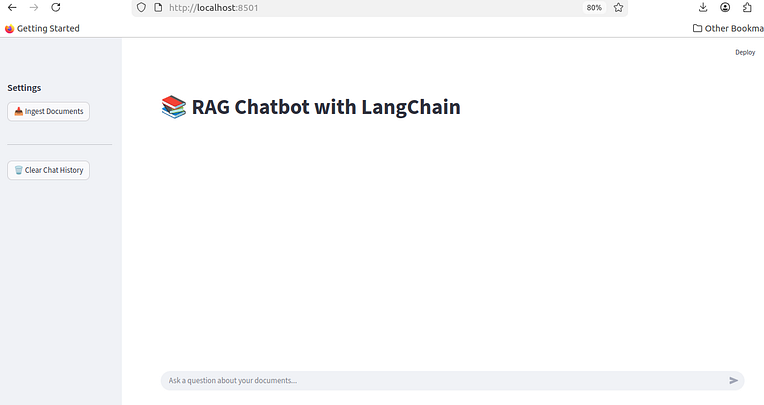
Once it’s up, open:
5️⃣ Ingest Documents from the UI
Inside the Streamlit page:
- Go to the left sidebar
- Click 📥 Ingest Documents
- The app will:
- Load all PDFs from
data/ - Split them into text chunks
- Call OpenAIEmbeddings to generate embeddings
- Store the vector store in
chroma_db/
If successful, you’ll see:
✅ Ingested X document chunks!

6️⃣ Ask Questions in the Chat
Now at the bottom of the page:
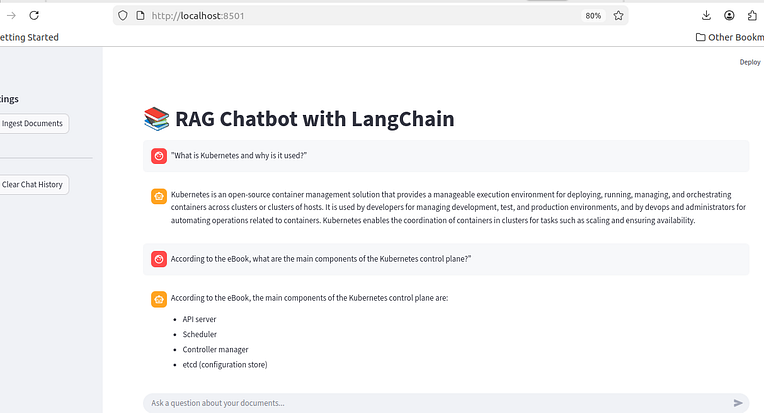
- Type a question like:
“What is Kubernetes and why is it used?”
“According to the eBook, what are the main components of the Kubernetes control plane?”
The chat flow:
- Uses
st.chat_inputto capture your prompt - Retrieves relevant chunks from
Chroma - Builds a prompt via
ChatPromptTemplate - Sends it to
ChatOpenAIwith the context - Streams the answer back into the UI
You should see document-grounded answers, not generic responses.
7️⃣ (Optional) Run Ingestion via Script Instead of UI
You also have ingest_database.py, which can perform ingestion from the CLI.
It uses:
from langchain_openai.embeddings import OpenAIEmbeddings
from langchain_chroma import Chroma
from langchain_community.document_loaders import PyPDFDirectoryLoader
Run it as:
python ingest_database.py
This will:
- Load PDFs from
data/ - Generate embeddings (via OpenAI)
- Populate the same
chroma_db/directory
After that, when you launch chatbot.py, it will attach to the existing vector store.
8️⃣ Run Locally Without Docker (Option B)
If you prefer to run it directly on your machine:
1. Create & activate virtualenv (optional but recommended)
python -m venv venv
source venv/bin/activate   # on Windows: venv\Scripts\activate
2. Install dependencies
pip install --upgrade pip
pip install -r requirements.txt
3. Ensure .env has your OPENAI_API_KEY
(As shown earlier)
4. Run the app
streamlit run chatbot.py
Then open:
🧪 How to Confirm It’s Really Using Your PDFs
A few good tests:
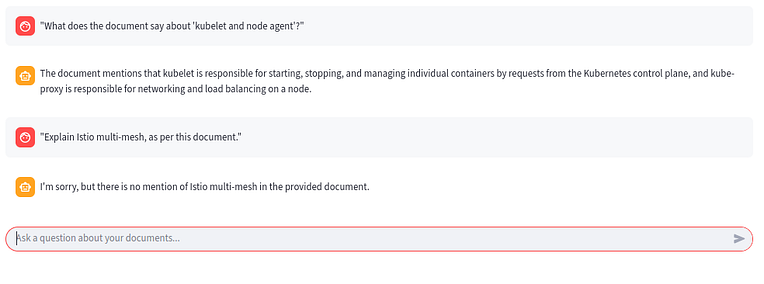
- Ask about a very specific phrase from your PDF
- “What does the document say about ‘kubelet and node agent’?”
- Ask something not present in the documen
- “Explain Istio multi-mesh, as per this document.”
— The bot should say it’s not mentioned.
- Ask for a summary of a specific chapter / section
- “Summarize the chapter that explains Kubernetes cluster components.”
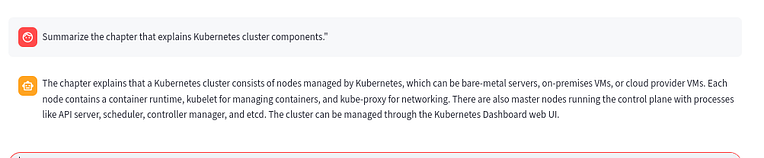
If the answers match your docs and don’t hallucinate unrelated content, your RAG setup is working well.
🔮 Possible Next Steps (Future Work)
Right now, this project is:
- ✅ OpenAI only
- ✅ RAG-based
- ✅ Streamlit UI + Dockerized
You could extend it by:
- Adding source citations (showing which PDF pages were used)
- Adding upload-from-UI instead of manual
data/copy - Swapping OpenAI models (e.g., GPT-4o)
- Adding rate limiting & logging
- Creating a FastAPI backend and separating the UI
🙌 Conclusion
You’ve built a full Retrieval-Augmented Generation chatbot from scratch — including ingestion, embeddings, search, and a fully interactive UI.
This project is perfect for:
- ML Engineers
- MLOps portfolios
- DevOps engineers learning GenAI
- Interview preparation
- Production RAG deployments