Building a Production-Ready Multi-Model NLP API with Hugging Face & Docker
 rjshk013
December 23, 2025
rjshk013
December 23, 2025
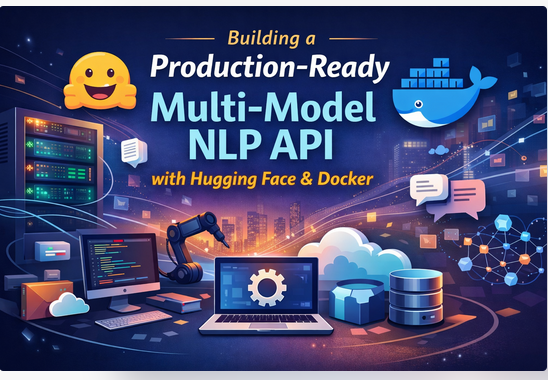
MLOps Project Series: part 3
Introduction
Machine Learning Operations (MLOps) is the discipline of delivering machine learning systems to production reliably and efficiently. This comprehensive guide walks you through building a real-world MLOps project: a production-ready multi-model NLP API with 4 Hugging Face models running in Docker.
By the end of this series, you’ll have:
- ✅ A working NLP API with 4 different models
- ✅ Docker containerization for easy deployment
- ✅ FastAPI REST endpoints
- ✅ Production-ready error handling
- ✅ Knowledge of MLOps best practices
Table of Contents
- Part 1: Project Setup & Architecture
- Part 2: Understanding the 4 NLP Models
- Part 3: Building the FastAPI Server
- Part 4: Containerization with Docker
- Part 5: Testing & Verification
Part 1: Project Setup & Architecture
What We’re Building
┌─────────────────────────────────────────────────┐
│         Multi-Model NLP API (Production)         │
├─────────────────────────────────────────────────┤
│  FastAPI Server (Python 3.11)                   │
│  ├─ /analyze/sentiment     (Sentiment Analysis) │
│  ├─ /analyze/ner           (Entity Recognition) │
│  ├─ /analyze/zero-shot     (Classification)     │
│  └─ /analyze/summarize     (Summarization)      │
│                                                  │
│  Models (Hugging Face)                          │
│  ├─ distilbert (Sentiment)                      │
│  ├─ bert-base-NER (NER)                         │
│  ├─ bart-large-mnli (Zero-Shot)                 │
│  └─ bart-large-cnn (Summarization)              │
│                                                  │
│  Infrastructure                                 │
│  └─ Docker Container (python:3.11-slim)        │
└─────────────────────────────────────────────────┘
Project Structure
nlp_end2end/
├── api.py                 # FastAPI application (4 models)
├── call_api.py           # Test script
├── requirements.txt      # Python dependencies
├── Dockerfile            # Container configuration
└── .dockerignore        # Docker optimization
Prerequisites
Before starting, ensure you have:
# Check Python version
python3 --version          # Should be 3.8+

# Install Docker
docker --version           # Should be 20.10+

# Verify pip
pip3 --version            # Should be 20.0+
Step 1: Create Project Directory
# Clone the repo contians the entire code

git clone git@github.com:rjshk013/mlops-project.git
cd ~/mlops-project/huggingface-project/nlp_huggingface

# Create virtual environment
python3 -m venv venv
source venv/bin/activate

# Verify
which python
python --version
Step 2: Initialize Dependencies
# Create requirements.txt
cat > requirements.txt << 'EOF'
fastapi==0.104.1
uvicorn==0.24.0
pydantic==2.5.0
transformers==4.36.2
torch==2.1.1
requests==2.31.0
EOF

# Install dependencies
pip install -r requirements.txt

# Verify installation
python -c "from fastapi import FastAPI; print('✓ FastAPI installed')"
python -c "from transformers import pipeline; print('✓ Transformers installed')"
MLOps Principle #1: Environment Consistency
Why it matters: The requirements.txt with pinned versions ensures:
- Same environment across machines
- Reproducible builds
- No “works on my machine” problems
- Production stability
Best Practice:
❌ Bad:  transformers
✅ Good: transformers==4.36.2
Part 2: Understanding the 4 NLP Models
Model 1: Sentiment Analysis (DistilBERT)
What It Does
Classifies text as POSITIVE or NEGATIVE
When to Use
- Product reviews
- Customer feedback
- Social media monitoring
- Sentiment trending
Code Example
from transformers import pipeline

sentiment_pipeline = pipeline(
    "sentiment-analysis",
    model="distilbert-base-uncased-finetuned-sst-2-english"
)

result = sentiment_pipeline("I love this product!")
# Output: [{'label': 'POSITIVE', 'score': 0.9999}]
Performance
- Size: 268 MB
- Speed: <100ms per request
- Accuracy: 98%+
- Use Case: Real-time sentiment analysis
Model 2: Named Entity Recognition (BERT-NER)
What It Does
Extracts entities (names, organizations, locations) from text
When to Use
- Information extraction
- Resume parsing
- Document analysis
- Knowledge graph building
Code Example
ner_pipeline = pipeline(
    "ner",
    model="dslim/bert-base-NER",
    aggregation_strategy="simple"
)

result = ner_pipeline("Apple CEO Tim Cook announced in California")
# Output: [
#   {'word': 'Apple', 'entity_group': 'ORG', 'score': 0.9998},
#   {'word': 'Tim Cook', 'entity_group': 'PER', 'score': 0.9987},
#   {'word': 'California', 'entity_group': 'LOC', 'score': 0.9995}
# ]
Entities Recognized
- PER: Person names
- ORG: Organizations/companies
- LOC: Locations/places
- MISC: Miscellaneous
Performance
- Size: 420 MB
- Speed: 150-300ms
- Accuracy: 96%+
- Use Case: Data extraction at scale
Model 3: Zero-Shot Classification (BART-MNLI)
What It Does
Classifies text into custom categories WITHOUT training
When to Use
- Email filtering (spam/legitimate/phishing)
- Content moderation
- Intent detection
- Dynamic classification
Code Example
zero_shot_pipeline = pipeline(
    "zero-shot-classification",
    model="facebook/bart-large-mnli"
)

result = zero_shot_pipeline(
    "Click here to claim your prize!",
    labels=["spam", "legitimate", "phishing"]
)
# Output: {
#   'sequence': 'Click here to claim your prize!',
#   'labels': ['spam', 'phishing', 'legitimate'],
#   'scores': [0.9985, 0.0009, 0.0004]
# }
Key Advantage
Custom labels – Define your own categories on the fly!
Performance
- Size: 1.6 GB
- Speed: 200-500ms
- Flexibility: Unlimited label combinations
- Use Case: Dynamic content classification
Model 4: Text Summarization (BART-CNN)
What It Does
Creates shorter summaries of long text
When to Use
- News summarization
- Document summarization
- Meeting notes
- Article previews
Code Example
summarization_pipeline = pipeline(
    "summarization",
    model="facebook/bart-large-cnn"
)

text = """
Artificial Intelligence is transforming industries worldwide.
Machine learning enables computers to learn from data without
explicit programming. Deep learning uses neural networks to
process complex patterns. These technologies revolutionize
healthcare, finance, transportation and education.
"""

result = summarization_pipeline(text, max_length=50, min_length=10)
# Output: [{'summary_text': 'Machine learning enables computers to
# learn from data. Deep learning uses neural networks. These
# technologies revolutionize healthcare and finance.'}]
Performance
- Size: 1.6 GB
- Speed: 1-3 seconds for long text
- Quality: Good extractive summaries
- Use Case: Bulk summarization
Model Comparison Matrix
| Feature | Sentiment | NER | Zero-Shot | Summarization |
|---|---|---|---|---|
| Size | 268 MB | 420 MB | 1.6 GB | 1.6 GB |
| Speed | <100ms | 150-300ms | 200-500ms | 1-3s |
| Accuracy | 98%+ | 96%+ | 90%+ | 85%+ |
| Customizable | No | No | YES | No |
| Batch Ready | Yes | Yes | Yes | Limited |
| Real-time | Yes | Yes | Yes | No |
Part 3: Building the FastAPI Server
Why FastAPI?
Traditional Flask:
  ❌ Slow
  ❌ No type hints
  ❌ Manual validation

Modern FastAPI:
  ✅ 3x faster
  ✅ Auto-documentation
  ✅ Built-in validation
  ✅ ASGI async support
  ✅ Production-ready
Step 1: Create API File
Create api.py:
from fastapi import FastAPI
from pydantic import BaseModel
from transformers import pipeline
from typing import List
import logging

# Setup logging
logging.basicConfig(level=logging.INFO)
logger = logging.getLogger(__name__)

# Initialize FastAPI
app = FastAPI(title="Multi-Model NLP API")

# ============================================================================
# INITIALIZE MODELS
# ============================================================================

try:
    logger.info("Loading sentiment model...")
    sentiment_pipeline = pipeline(
        "sentiment-analysis",
        model="distilbert-base-uncased-finetuned-sst-2-english"
    )
    logger.info("✓ Sentiment model loaded")
except Exception as e:
    logger.error(f"Error loading sentiment model: {e}")
    sentiment_pipeline = None

try:
    logger.info("Loading NER model...")
    ner_pipeline = pipeline(
        "ner",
        model="dslim/bert-base-NER",
        aggregation_strategy="simple"
    )
    logger.info("✓ NER model loaded")
except Exception as e:
    logger.error(f"Error loading NER model: {e}")
    ner_pipeline = None

try:
    logger.info("Loading zero-shot model...")
    zero_shot_pipeline = pipeline(
        "zero-shot-classification",
        model="facebook/bart-large-mnli"
    )
    logger.info("✓ Zero-shot model loaded")
except Exception as e:
    logger.error(f"Error loading zero-shot model: {e}")
    zero_shot_pipeline = None

try:
    logger.info("Loading summarization model...")
    summarization_pipeline = pipeline(
        "summarization",
        model="facebook/bart-large-cnn"
    )
    logger.info("✓ Summarization model loaded")
except Exception as e:
    logger.error(f"Error loading summarization model: {e}")
    summarization_pipeline = None

logger.info("All models initialized!")
Step 2: Define Data Models (Pydantic)
# Data Models for request validation
class SentimentRequest(BaseModel):
    input_string: str

class NERRequest(BaseModel):
    input_string: str

class ZeroShotRequest(BaseModel):
    input_string: str
    labels: List[str]
    multi_class: bool = False

class SummarizationRequest(BaseModel):
    input_string: str
    max_length: int = 50
    min_length: int = 10
MLOps Principle #2: Type Safety
Pydantic provides:
- ✅ Automatic request validation
- ✅ Type checking
- ✅ Error messages
- ✅ Auto-documentation
Step 3: Define Endpoints
# ============================================================================
# ENDPOINTS
# ============================================================================

@app.get("/health")
def health_check():
    """Health check endpoint"""
    return {
        "status": "healthy",
        "models": [
            "sentiment-analysis",
            "named-entity-recognition",
            "zero-shot-classification",
            "summarization"
        ]
    }

@app.post("/analyze")
def analyze(request: SentimentRequest):
    """Primary endpoint: Sentiment analysis"""
    if sentiment_pipeline is None:
        return {"error": "Sentiment model not loaded"}

    try:
        result = sentiment_pipeline(request.input_string)
        return {
            "result": {
                "sentiment": result[0]["label"],
                "score": round(float(result[0]["score"]), 4)
            }
        }
    except Exception as e:
        logger.error(f"Error: {e}")
        return {"error": str(e)}

@app.post("/analyze/ner")
def analyze_ner(request: NERRequest):
    """Extract named entities"""
    if ner_pipeline is None:
        return {"error": "NER model not loaded"}

    try:
        entities = ner_pipeline(request.input_string)
        return {
            "input": request.input_string,
            "model": "bert-base-NER",
            "entities": entities,
            "total_entities": len(entities)
        }
    except Exception as e:
        logger.error(f"Error: {e}")
        return {"error": str(e)}

@app.post("/analyze/zero-shot")
def analyze_zero_shot(request: ZeroShotRequest):
    """Custom classification with labels"""
    if zero_shot_pipeline is None:
        return {"error": "Zero-shot model not loaded"}

    try:
        result = zero_shot_pipeline(
            request.input_string,
            request.labels,
            multi_class=request.multi_class
        )
        return {
            "input": request.input_string,
            "model": "bart-large-mnli",
            "labels": result["labels"],
            "scores": [round(float(s), 4) for s in result["scores"]]
        }
    except Exception as e:
        logger.error(f"Error: {e}")
        return {"error": str(e)}

@app.post("/analyze/summarize")
def analyze_summarization(request: SummarizationRequest):
    """Summarize text"""
    if summarization_pipeline is None:
        return {"error": "Summarization model not loaded"}

    try:
        if len(request.input_string.split()) < 20:
            return {"error": "Text too short (minimum 20 words)"}

        summary = summarization_pipeline(
            request.input_string,
            max_length=request.max_length,
            min_length=request.min_length,
            do_sample=False
        )

        return {
            "input": request.input_string,
            "model": "bart-large-cnn",
            "summary": summary[0]["summary_text"],
            "original_length": len(request.input_string),
            "summary_length": len(summary[0]["summary_text"])
        }
    except Exception as e:
        logger.error(f"Error: {e}")
        return {"error": str(e)}
Step 4: Test Locally
# Activate virtual environment
source venv/bin/activate

# Install dependencies
pip install -r requirements.txt

# Run server
uvicorn api:app --reload --host 0.0.0.0 --port 8000
Expected output:
INFO:     Uvicorn running on http://0.0.0.0:8000
INFO:     Application startup complete
Step 5: Test Endpoints
# In another terminal:

# Health check
curl http://localhost:8000/health

# Sentiment
curl -X POST http://localhost:8000/analyze \
  -H 'Content-Type: application/json' \
  -d '{"input_string": "I love this!"}'

# NER
curl -X POST http://localhost:8000/analyze/ner \
  -H 'Content-Type: application/json' \
  -d '{"input_string": "Apple CEO Tim Cook"}'

# Zero-shot
curl -X POST http://localhost:8000/analyze/zero-shot \
  -H 'Content-Type: application/json' \
  -d '{"input_string":"Spam email","labels":["spam","legitimate"]}'

# Summarization
curl -X POST http://localhost:8000/analyze/summarize \
  -H 'Content-Type: application/json' \
  -d '{"input_string":"AI is transforming industries. Machine learning enables computers to learn from data. Deep learning uses neural networks. These technologies revolutionize healthcare, finance, transportation and education."}'
MLOps Principle #3: Error Handling
Every endpoint includes:
try:
    # Process request
except Exception as e:
    # Log error
    logger.error(f"Error: {e}")
    # Return error response
    return {"error": str(e)}
This ensures:
- ✅ Server doesn’t crash
- ✅ Errors are logged
- ✅ Client gets feedback
- ✅ Production stability
Part 4: Containerization with Docker
Why Docker for MLOps?
Without Docker:
  ❌ "Works on my machine"
  ❌ Different environments
  ❌ Hard to deploy
  ❌ Dependency conflicts

With Docker:
  ✅ Consistent environments
  ✅ Easy deployment
  ✅ Version control
  ✅ Scalable
Step 1: Create Dockerfile
Create Dockerfile:
# Use Python 3.11-slim (modern, lightweight, secure)
FROM python:3.11-slim

# Set working directory
WORKDIR /app

# Copy requirements first (improves Docker caching)
COPY requirements.txt requirements.txt

# Install dependencies
RUN pip install --no-cache-dir -r requirements.txt && \
    pip cache purge

# Copy application code
COPY . /app

# Expose port 8000
EXPOSE 8000

# Health check
HEALTHCHECK --interval=30s --timeout=10s --start-period=40s --retries=3 \
    CMD python -c "import requests; requests.get('http://localhost:8000/health')" || exit 1

# Run the application
CMD ["uvicorn", "api:app", "--host", "0.0.0.0", "--port", "8000"]
Step 2: Create .dockerignore
Create .dockerignore:
__pycache__
*.pyc
*.pyo
*.pyd
.Python
venv/
.venv/
.git
.gitignore
.env
.DS_Store
README.md
*.md
Step 3: Build Image
# Build Docker image
docker build -t sentiment-app:latest .

# This will:
# 1. Download base Python 3.11 image (~150MB)
# 2. Install dependencies (~2GB)
# 3. Copy your code
# 4. Create image (~4GB total)

# Takes 3-5 minutes on first build
Step 4: Run Container
# Run container
docker run -d -p 8000:8000 sentiment-app:latest

# Verify it's running
docker ps

# Check logs
docker logs $(docker ps -q)

# View last 50 lines
docker logs --tail 50 $(docker ps -q)

# Follow logs in real-time
docker logs -f $(docker ps -q)
Docker Best Practices
Layer Caching
# ❌ Bad: Code changes require re-installing all dependencies
COPY . /app
RUN pip install -r requirements.txt

# ✅ Good: Dependencies only rebuild if requirements.txt changes
COPY requirements.txt requirements.txt
RUN pip install -r requirements.txt
COPY . /app
Image Size Optimization
# ❌ Bad: 500MB+
FROM python:3.11

# ✅ Good: ~150MB
FROM python:3.11-slim
Security
# ✅ Use specific versions (not latest)
FROM python:3.11-slim

# ✅ Create non-root user (production)
RUN useradd -m appuser
USER appuser
MLOps Principle #4: Infrastructure as Code
Dockerfile is code that defines:
- Environment
- Dependencies
- Configuration
- Runtime behavior
Benefits:
- ✅ Reproducible builds
- ✅ Version control
- ✅ Collaboration
- ✅ Automation
Part 5: Testing & Verification
Step 1: Health Check
# Test if API is responding
curl http://localhost:8000/health

# Expected response:
# {"status":"healthy","models":["sentiment-analysis",...]}

Step 2: Test Each Endpoint
#!/bin/bash

echo "Testing Sentiment Analysis..."
curl -X POST http://localhost:8000/analyze \
  -H 'Content-Type: application/json' \
  -d '{"input_string": "This is amazing!"}'

echo "Testing NER..."
curl -X POST http://localhost:8000/analyze/ner \
  -H 'Content-Type: application/json' \
  -d '{"input_string": "Apple Inc"}'

echo "Testing Zero-Shot..."
curl -X POST http://localhost:8000/analyze/zero-shot \
  -H 'Content-Type: application/json' \
  -d '{"input_string":"Spam","labels":["spam","legitimate"]}'

echo "Testing Summarization..."
curl -X POST http://localhost:8000/analyze/summarize \
  -H 'Content-Type: application/json' \
  -d '{"input_string":"Long text about AI and machine learning technologies..."}'
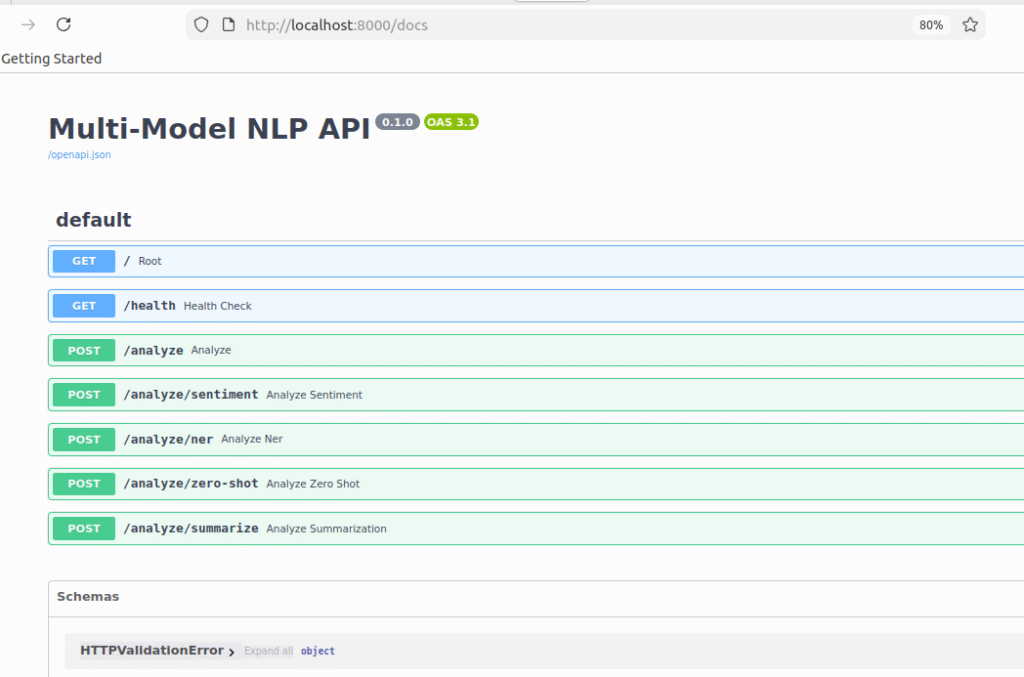
Step 3: Create Test Script
Create call_api.py:
import requests
import json

BASE_URL = "http://localhost:8000"

def test_sentiment():
    response = requests.post(
        f"{BASE_URL}/analyze",
        json={"input_string": "I love this!"}
    )
    print("Sentiment:", json.dumps(response.json(), indent=2))

def test_ner():
    response = requests.post(
        f"{BASE_URL}/analyze/ner",
        json={"input_string": "Apple CEO Tim Cook"}
    )
    print("NER:", json.dumps(response.json(), indent=2))

def test_zero_shot():
    response = requests.post(
        f"{BASE_URL}/analyze/zero-shot",
        json={
            "input_string": "Click here!",
            "labels": ["spam", "legitimate"]
        }
    )
    print("Zero-Shot:", json.dumps(response.json(), indent=2))

def test_summarization():
    response = requests.post(
        f"{BASE_URL}/analyze/summarize",
        json={
            "input_string": "AI is transforming industries. Machine learning enables computers to learn from data. Deep learning uses neural networks. These technologies revolutionize healthcare, finance, transportation and education."
        }
    )
    print("Summarization:", json.dumps(response.json(), indent=2))

if __name__ == "__main__":
    print("Testing API endpoints...\n")
    test_sentiment()
    print("\n")
    test_ner()
    print("\n")
    test_zero_shot()
    print("\n")
    test_summarization()
    print("\n✓ All tests completed!")
Run tests:
python3 call_api.py
Conclusion
What You’ve Built
| Component | Status |
|---|---|
| 4 NLP Models | ✅ Integrated |
| FastAPI Server | ✅ Working |
| Docker Container | ✅ Deployed |
| REST Endpoints | ✅ Tested |
| Error Handling | ✅ Implemented |
| Health Checks | ✅ Configured |
MLOps Principles Learned
- Environment Consistency – Reproducible builds
- Type Safety – Validation & error prevention
- Error Handling – Graceful failures
- Infrastructure as Code – Version control everything
- Monitoring – Know what’s happening
Next Steps
Beginner
- [ ] Customize models for your domain
- [ ] Add web UI (React, Vue)
- [ ] Deploy to local machine
Intermediate
- [ ] Add authentication (API keys)
- [ ] Implement caching (Redis)
- [ ] Add database (PostgreSQL)
Advanced
- [ ] Setup CI/CD (GitHub Actions)
- [ ] Kubernetes deployment
- [ ] ML model monitoring
- [ ] A/B testing framework
Resources
Final Checklist
- ✅ API running locally
- ✅ All endpoints tested
- ✅ Docker image built
- ✅ Container deployed
- ✅ Health checks passing
- ✅ Documentation complete