CLDOP Real-World DevOps Project Series-Part 3
 rjshk013
November 13, 2025
rjshk013
November 13, 2025
Part 3: From Local to Hybrid Cloud – Deploy MERN Stack on Kind with AWS ECR & Secrets Manager
Introduction: Bringing It All Together
Welcome back to our Real-World DevOps Project Series! In Part 1, we built our MERN stack application with Docker Compose. In Part 2, we set up a production-grade Kind cluster with MongoDB, Redis, and RabbitMQ running as StatefulSets with persistent storage.
Now comes the exciting part – deploying our MERN application to this local Kubernetes cluster while leveraging AWS cloud services! This hybrid approach gives you the best of both worlds: local development speed with cloud-native practices.
What makes this approach unique?
We’re going to use AWS ECR (Elastic Container Registry) to store our Docker images and AWS Secrets Manager to securely manage our application secrets – all while running on a local Kind cluster. This is exactly how modern DevOps teams work: develop locally, use cloud services for artifacts and secrets, then deploy anywhere.
What You’ll Learn
By the end of this tutorial, you’ll master:
- Building and pushing Docker images to AWS ECR
- Managing application secrets with AWS Secrets Manager
- Creating production-grade Helm charts for frontend and backend
- Configuring Kubernetes to pull private images from ECR
- Integrating AWS services with local Kubernetes
- Deploying a full-stack application using Helm
- Best practices for secrets management in Kubernetes
Why This Approach Matters
This hybrid cloud-native pattern is used by companies worldwide because it:
- Keeps development costs near zero (no expensive cloud clusters)
- Uses production-grade tooling (ECR, Secrets Manager, Helm)
- Enables seamless transition from local to cloud
- Maintains consistency across environments
- Provides enterprise-level security practices
Let’s dive in!
Architecture Overview
Before we start, let’s understand what we’re building:
Infrastructure (Already Running from Part 2):
- Kind Cluster on Ubuntu
- MongoDB StatefulSet (5Gi persistent storage)
- Redis (1Gi persistent storage)
- RabbitMQ StatefulSet (5Gi persistent storage)
- Custom StorageClass: mern-storage
What We’ll Add in Part 3:
- AWS ECR repositories for frontend and backend images
- AWS Secrets Manager for sensitive configuration
- Backend Deployment (Node.js/Express API)
- Frontend Deployment (React application)
- Kubernetes Services for routing
- ConfigMaps for non-sensitive configuration
- ImagePullSecrets for ECR authentication
- Helm charts for deployment automation
Prerequisites Check
Before proceeding, ensure you have:
From Part 2 (Already Completed):
- Kind cluster running on Ubuntu
- MongoDB StatefulSet with credentials (mernapp/mernapp123)
- Redis running without authentication
- RabbitMQ StatefulSet with credentials (admin/Admin12345)
- All services in
mern-stacknamespace
Verify Your Setup:
# Check Kind cluster
kind get clusters

# Verify all StatefulSets are running
kubectl get statefulsets -n mern-stack


# Check all pods are healthy
kubectl get pods -n mern-stack

# Verify persistent volumes
kubectl get pvc -n mern-stack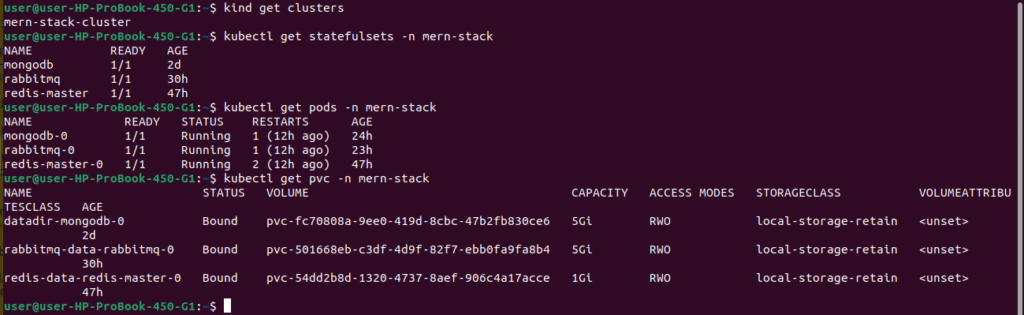
Step 1: Prepare Your Application Code
First, let’s get our MERN application code ready.
Clone the Repository:
# Clone the complete project
git clone https://github.com/rjshk013/cldop-projecthub.git
cd ecommerce-app

# Check project structure
ls -la
# You should see: backend/, frontend/, docker-compose.yaml, images/
Important Note: Ensure your Dockerfiles are optimized for production. They should use multi-stage builds, non-root users, and minimal base images.
Here is the backend Dockerfile we are using
FROM node:18-alpine AS builder

WORKDIR /app

COPY package*.json ./

# Install only production dependencies
RUN npm ci --omit=dev && \
    npm cache clean --force

# ============================================
# Final production image
# ============================================
FROM node:18-alpine

WORKDIR /app

# Copy only what we need from builder
COPY --from=builder /app/node_modules ./node_modules

# Copy application code
COPY . .

# Non-root user
RUN addgroup -g 1001 -S nodejs && \
    adduser -S nodeuser -u 1001 && \
    chown -R nodeuser:nodejs /app

USER nodeuser

EXPOSE 5000

CMD ["node", "server.js"]
Frontend Dockerfile
# Multi-stage build for React app
FROM node:18-alpine as build

WORKDIR /app

# Copy package files
COPY package*.json ./

# Install dependencies
RUN npm install

# Copy source code
COPY . .

# Build the app
RUN npm run build

# Production stage with Nginx
FROM nginx:alpine

# Copy custom nginx config
COPY nginx.conf /etc/nginx/conf.d/default.conf

# Copy built app from previous stage
COPY --from=build /app/build /usr/share/nginx/html

# Expose port 80
EXPOSE 80

# Start nginx
CMD ["nginx", "-g", "daemon off;"]
Step 2: Create AWS ECR Repositories
AWS ECR will store our Docker images securely in the cloud.
Why ECR?
- Private container registry
- Integrates seamlessly with AWS services
- Built-in security scanning
- Pay only for storage used
- No rate limiting (unlike Docker Hub)
# Set variables
export AWS_REGION="us-east-1"
export AWS_ACCOUNT_ID=$(aws sts get-caller-identity --query Account --output text)
export BACKEND_REPO_NAME="mern-backend"
export FRONTEND_REPO_NAME="mern-frontend"

# Create backend repository
aws ecr create-repository \
    --repository-name $BACKEND_REPO_NAME \
    --region $AWS_REGION \
    --image-scanning-configuration scanOnPush=true \
    --encryption-configuration encryptionType=AES256

# Save backend repository URI
export BACKEND_ECR_URI="${AWS_ACCOUNT_ID}.dkr.ecr.${AWS_REGION}.amazonaws.com/${BACKEND_REPO_NAME}"
echo "Backend ECR URI: $BACKEND_ECR_URI"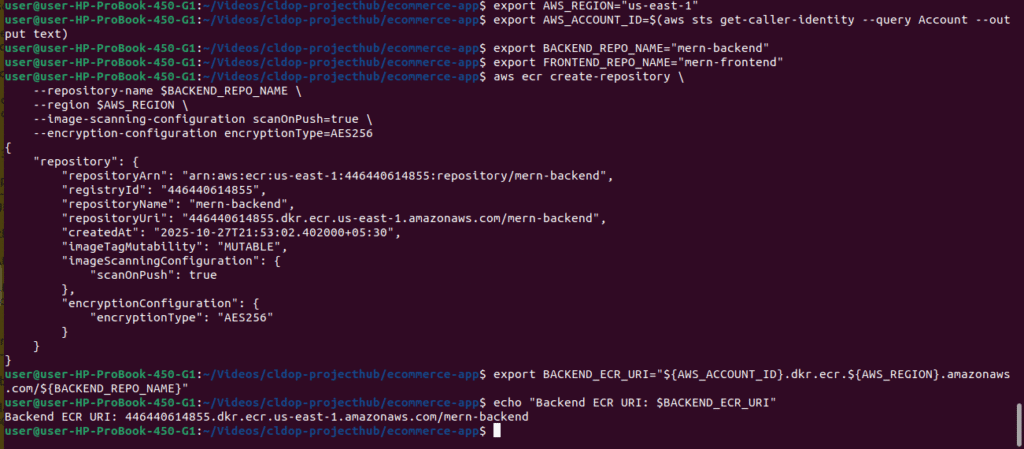
Create Frontend ECR Repository:
# Create frontend repository
aws ecr create-repository \
    --repository-name $FRONTEND_REPO_NAME \
    --region $AWS_REGION \
    --image-scanning-configuration scanOnPush=true \
    --encryption-configuration encryptionType=AES256

# Save frontend repository URI
export FRONTEND_ECR_URI="${AWS_ACCOUNT_ID}.dkr.ecr.${AWS_REGION}.amazonaws.com/${FRONTEND_REPO_NAME}"
echo "Frontend ECR URI: $FRONTEND_ECR_URI"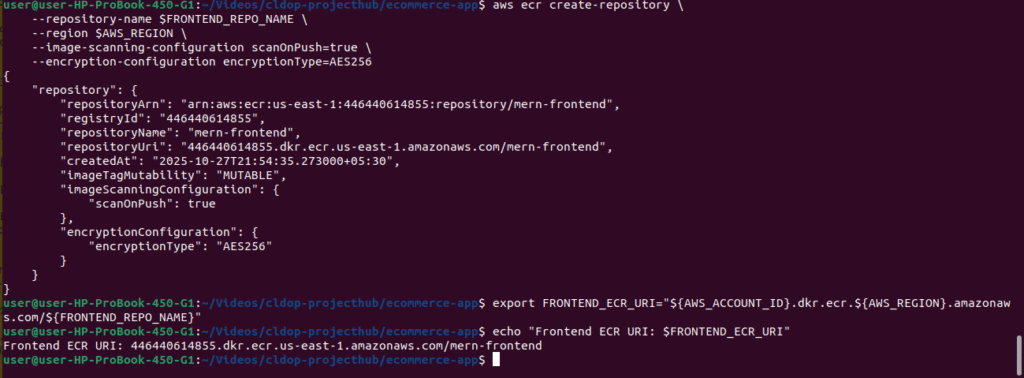
Verify Repositories Created:
# List ECR repositories
aws ecr describe-repositories --region $AWS_REGION

# You should see both mern-backend and mern-frontend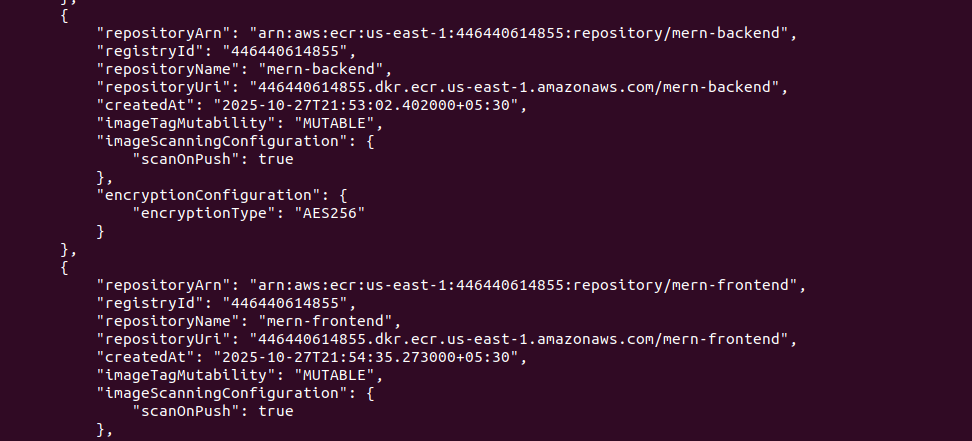
Step 3: Build and Push Docker Images to ECR
Now let’s build our application images and push them to ECR.
Authenticate Docker to ECR:
# Login to ECR
aws ecr get-login-password --region $AWS_REGION | \
    docker login --username AWS --password-stdin \
    ${AWS_ACCOUNT_ID}.dkr.ecr.${AWS_REGION}.amazonaws.com

# Should see: Login Succeeded
Build Backend Image:
# Navigate to backend directory
cd ~/cldop-projecthub/ecommerce-app/backend

# Build image with version tag
docker build -t $BACKEND_REPO_NAME:v1.0.0  -f Dockerfile.prod .

# Tag for ECR
docker tag $BACKEND_REPO_NAME:v1.0.0 $BACKEND_ECR_URI:v1.0.0
docker tag $BACKEND_REPO_NAME:v1.0.0 $BACKEND_ECR_URI:latest

# Push to ECR
docker push $BACKEND_ECR_URI:v1.0.0
docker push $BACKEND_ECR_URI:latest

echo "✅ Backend image pushed successfully!"
Build Frontend Image:
# Navigate to frontend directory
cd ~/mern-stack-k8s/mern-app/frontend

# Build image
docker build -t $FRONTEND_REPO_NAME:v1.0.0 -f Dockerfile.prod .

# Tag for ECR
docker tag $FRONTEND_REPO_NAME:v1.0.0 $FRONTEND_ECR_URI:v1.0.0
docker tag $FRONTEND_REPO_NAME:v1.0.0 $FRONTEND_ECR_URI:latest

# Push to ECR
docker push $FRONTEND_ECR_URI:v1.0.0
docker push $FRONTEND_ECR_URI:latest

echo "✅ Frontend image pushed successfully!"
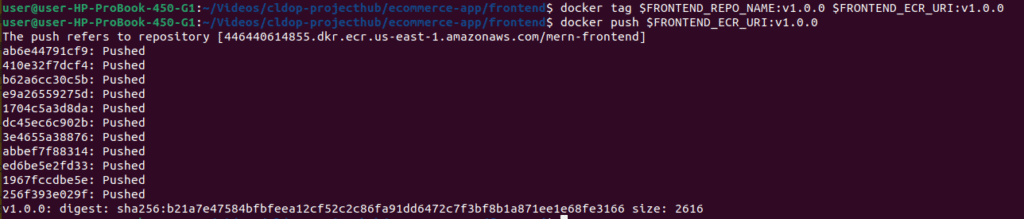
Verify Images in ECR:
# List backend images
aws ecr list-images \
    --repository-name $BACKEND_REPO_NAME \
    --region $AWS_REGION

# List frontend images
aws ecr list-images \
    --repository-name $FRONTEND_REPO_NAME \
    --region $AWS_REGION

# Check image details
aws ecr describe-images \
    --repository-name $BACKEND_REPO_NAME \
    --region $AWS_REGION

Step 4: Store Secrets in AWS Secrets Manager
Instead of hardcoding sensitive data, we’ll use AWS Secrets Manager.
Why AWS Secrets Manager?
- Centralized secret management
- Automatic rotation capability
- Encrypted at rest and in transit
- Audit logs for compliance
- Integration with IAM policies
first create the required envs in a file named .envmern as below
JWT_SECRET=<replacewithyourjwtkey>
AWS_ACCESS_KEY_ID=AKxxxxxxxxxxxxxxxxxxx
AWS_SECRET_ACCESS_KEY=N2xxxxxxxxxxxxxxxxxxx
AWS_REGION=<yourregion>
S3_BUCKET_NAME=yourbucketname
EMAIL_USER=yourmail@gmail.com
EMAIL_PASSWORD=qxxxxxxxx
REDIS_HOST=redis-master.mern-stack.svc.cluster.local
REDIS_PORT="6379"
PORT="5000"
NODE_ENV=production
MONGODB_URI=mongodb://mernapp:mernapp123@mongodb.mern-stack.svc.cluster.local:27017/merndb
RABBITMQ_URL=amqp://admin:Admin12345@rabbitmq.mern-stack.svc.cluster.local:5672/
HEADPHONES_IMAGE_URL=https://bucketname/products/headphones.jpg
SMARTWATCH_IMAGE_URL=https://bucketname/products/smartwatch.jpg
LAPTOPSTAND_IMAGE_URL=https://bucketname/products/laptop-stand.jpg
Setting Up Your Environment Variables
Create a .env file with the following configuration values:
1. Application & Authentication Settings
# Server Configuration
PORT="5000"
NODE_ENV=production

# JWT Authentication (replace with your own secret key)
JWT_SECRET=<replacewithyourjwtkey>
2. AWS Configuration
Reference: Check Part 1 of this series for how to obtain these values
AWS_ACCESS_KEY_ID=AKxxxxxxxxxxxxxxxxxxx
AWS_SECRET_ACCESS_KEY=N2xxxxxxxxxxxxxxxxxxx
AWS_REGION=<yourregion>
S3_BUCKET_NAME=yourbucketname
Email Configuration
EMAIL_USER=yourmail@gmail.com
EMAIL_PASSWORD=qxxxxxxxx
4. Product Image URLs
HEADPHONES_IMAGE_URL=https://bucketname/products/headphones.jpg
SMARTWATCH_IMAGE_URL=https://bucketname/products/smartwatch.jpg
LAPTOPSTAND_IMAGE_URL=https://bucketname/products/laptop-stand.jpg
5. Redis Configuration
Reference: Check Part 2 of this series to learn how to get the service name
REDIS_HOST=redis-master.mern-stack.svc.cluster.local
REDIS_PORT="6379"
Understanding the Redis Host:
redis-master= Service namemern-stack= Namespace- Format:
<service-name>.<namespace>.svc.cluster.local
6. Database & Message Queue URLs
Reference: Check Part 2 of this series for connection details
# MongoDB Connection
MONGODB_URI=mongodb://mernapp:mernapp123@mongodb.mern-stack.svc.cluster.local:27017/merndb

# RabbitMQ Connection
RABBITMQ_URL=amqp://admin:Admin12345@rabbitmq.mern-stack.svc.cluster.local:5672/
Create Backend Secrets from .envfile
aws secretsmanager create-secret \
  --name my-mern-backend-env \
  --description "Environment variables for my mern backend" \
  --secret-string "$(cat .envmern | grep -v '^#' | grep -v '^$' | jq -R -s 'split("\n") | map(select(length > 0) | split("=") | {(.[0]): .[1:]|join("=")}) | add')" --region us-east-1

Verify Secret Created:
List secrets
aws secretsmanager list-secrets –region $AWS_REGION
Get secret value (for verification)
aws secretsmanager get-secret-value \
--secret-id my-mern-backend-env \
--region $AWS_REGION \
--query SecretString \
--output text | jq '.'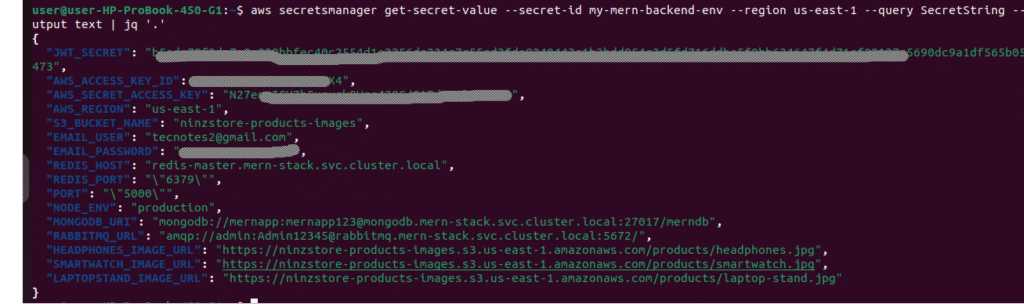
Step 6: Create ECR Pull Image Secret
Kubernetes needs credentials to pull private images from ECR.
Generate ECR Authentication Token:
# Get ECR password
ECR_PASSWORD=$(aws ecr get-login-password --region $AWS_REGION)

# Create Docker config secret
kubectl create secret docker-registry ecr-registry-secret \
  --docker-server=${AWS_ACCOUNT_ID}.dkr.ecr.${AWS_REGION}.amazonaws.com \
  --docker-username=AWS \
  --docker-password=$ECR_PASSWORD \
  --namespace=mern-stack

# Verify secret created
kubectl get secret ecr-registry-secret -n mern-stack
Important Note: ECR tokens expire after 12 hours. For production, use an IAM role for service accounts (IRSA) or regularly rotate the secret.

Step 5: Create Helm Charts for Backend and Frontend
Helm charts make deployment reproducible and manageable. Let’s create production-grade charts.
Create Helm Chart Directory Structure:
# Navigate to workspace
cd ~/mern-stack-k8s

# Create Helm charts directory
mkdir -p helm-charts
cd helm-charts

# Create backend chart
helm create mern-backend

# Create frontend chart
helm create mern-frontend

# Directory structure:
tree -L 2
Configure Backend Helm Chart:
cd mern-backend

cd mern-backend

# Edit values.yaml
cat > values.yaml <<EOF
# Backend Deployment Configuration

image:
  repository: 446440614855.dkr.ecr.us-east-1.amazonaws.com/mern-backend
  tag: "v1.0.0"
  pullPolicy: IfNotPresent

# attach the pull secret
imagePullSecrets:
  - name: ecr-registry-secret

replicas: 2

# Environment configuration
envFrom:
  secretRef:
    name: mern-backend-secrets

service:
  type: NodePort
  port: 5000
  nodePort: 32005

resources:
  requests:
    cpu: 100m
    memory: 128Mi
  limits:
    cpu: 500m
    memory: 512Mi
serviceAccount:
  create: false
  automount: true
  annotations: {}
  name: "default"  # Use the default service account

probes:
  startup:
    enabled: true
    path: /api/products
    initialDelaySeconds: 5
    periodSeconds: 3
    failureThreshold: 40       # ~60s total (2s * 30)
    timeoutSeconds: 2
  readiness:
    enabled: true
    path: /api/products
    initialDelaySeconds: 5
    periodSeconds: 5
    timeoutSeconds: 2
    failureThreshold: 2
    successThreshold: 1
  liveness:
    enabled: true
    path: /api/products
    initialDelaySeconds: 20
    periodSeconds: 10
    timeoutSeconds: 2
    failureThreshold: 3
Note: Replace the aws account ID & region accordingly
Deployment.yaml
apiVersion: apps/v1
kind: Deployment
metadata:
  name: {{ include "mern-backend.fullname" . }}
  labels:
    {{- include "mern-backend.labels" . | nindent 4 }}
spec:
  {{- if not .Values.autoscaling.enabled }}
  replicas: {{ .Values.replicaCount }}
  {{- end }}
  selector:
    matchLabels:
      {{- include "mern-backend.selectorLabels" . | nindent 6 }}
  template:
    metadata:
      {{- with .Values.podAnnotations }}
      annotations:
        {{- toYaml . | nindent 8 }}
      {{- end }}
      labels:
        {{- include "mern-backend.labels" . | nindent 8 }}
        {{- with .Values.podLabels }}
        {{- toYaml . | nindent 8 }}
        {{- end }}
    spec:
      {{- with .Values.imagePullSecrets }}
      imagePullSecrets:
        {{- toYaml . | nindent 8 }}
      {{- end }}
      serviceAccountName: {{ include "mern-backend.serviceAccountName" . }}
      securityContext:
        {{- toYaml .Values.podSecurityContext | nindent 8 }}
      containers:
        - name: {{ .Chart.Name }}
          securityContext:
            {{- toYaml .Values.securityContext | nindent 12 }}
          image: "{{ .Values.image.repository }}:{{ .Values.image.tag | default .Chart.AppVersion }}"
          imagePullPolicy: {{ .Values.image.pullPolicy }}
          ports:
            - name: http
              containerPort: {{ .Values.service.port }}
              protocol: TCP
          # Environment variables from secrets
          {{- if .Values.envFrom }}
          envFrom:
            {{- if .Values.envFrom.secretRef }}
            - secretRef:
                name: {{ .Values.envFrom.secretRef.name }}
            {{- end }}
            {{- if .Values.envFrom.configMapRef }}
            - configMapRef:
                name: {{ .Values.envFrom.configMapRef.name }}
            {{- end }}
          {{- end }}
          # Health checks
          {{- if and .Values.probes .Values.probes.startup .Values.probes.startup.enabled }}
          startupProbe:
            httpGet:
              path: {{ .Values.probes.startup.path }}
              port: {{ .Values.service.port }}
            initialDelaySeconds: {{ .Values.probes.startup.initialDelaySeconds | default 5 }}
            periodSeconds: {{ .Values.probes.startup.periodSeconds | default 2 }}
            failureThreshold: {{ .Values.probes.startup.failureThreshold | default 30 }}
            timeoutSeconds: {{ .Values.probes.startup.timeoutSeconds | default 2 }}
          {{- end }}
          {{- if and .Values.probes .Values.probes.readiness .Values.probes.readiness.enabled }}
          readinessProbe:
            httpGet:
              path: {{ .Values.probes.readiness.path }}
              port: {{ .Values.service.port }}
            initialDelaySeconds: {{ .Values.probes.readiness.initialDelaySeconds | default 5 }}
            periodSeconds: {{ .Values.probes.readiness.periodSeconds | default 5 }}
            timeoutSeconds: {{ .Values.probes.readiness.timeoutSeconds | default 2 }}
            failureThreshold: {{ .Values.probes.readiness.failureThreshold | default 2 }}
            successThreshold: {{ .Values.probes.readiness.successThreshold | default 1 }}
          {{- end }}
          {{- if and .Values.probes .Values.probes.liveness .Values.probes.liveness.enabled }}
          livenessProbe:
            httpGet:
              path: {{ .Values.probes.liveness.path }}
              port: {{ .Values.service.port }}
            initialDelaySeconds: {{ .Values.probes.liveness.initialDelaySeconds | default 20 }}
            periodSeconds: {{ .Values.probes.liveness.periodSeconds | default 10 }}
            timeoutSeconds: {{ .Values.probes.liveness.timeoutSeconds | default 2 }}
            failureThreshold: {{ .Values.probes.liveness.failureThreshold | default 3 }}
          {{- end }}
          resources:
            {{- toYaml .Values.resources | nindent 12 }}
      {{- with .Values.nodeSelector }}
      nodeSelector:
        {{- toYaml . | nindent 8 }}
      {{- end }}
      {{- with .Values.affinity }}
      affinity:
        {{- toYaml . | nindent 8 }}
      {{- end }}
      {{- with .Values.tolerations }}
      tolerations:
        {{- toYaml . | nindent 8 }}
      {{- end }}
Service.yaml
apiVersion: v1
kind: Service
metadata:
  name: {{ include "mern-backend.fullname" . }}
  labels:
    {{- include "mern-backend.labels" . | nindent 4 }}
spec:
  type: {{ .Values.service.type }}
  ports:
    - port: {{ .Values.service.port }}
      targetPort: http
      protocol: TCP
      name: http
  selector:
    {{- include "mern-backend.selectorLabels" . | nindent 4 }}
Create k8s secrets for backend .
We have to create k8s secrets for the backend using the below script
chmod +x mern-secrets-create.sh
./mern-secrets-create.sh
#!/bin/bash

AWS_SECRET=$(aws secretsmanager get-secret-value \
  --secret-id mern-backend-secrets \
  --query SecretString --output text)

kubectl delete secret mern-backend-secrets -n mern-stack 2>/dev/null

echo "$AWS_SECRET" | \
  jq -r 'to_entries[] | "--from-literal=\(.key)=\(.value)"' | \
  xargs kubectl create secret generic mern-backend-secrets --namespace mern-stack

echo "✅ Secret created successfully"

Validate Helm Charts:
# Lint backend chart
helm lint ~/mern-stack-k8s/helm-charts/mern-backend

# Dry-run to see generated manifests
helm template mern-backend ~/mern-stack-k8s/helm-charts/mern-backend --namespace mern-stack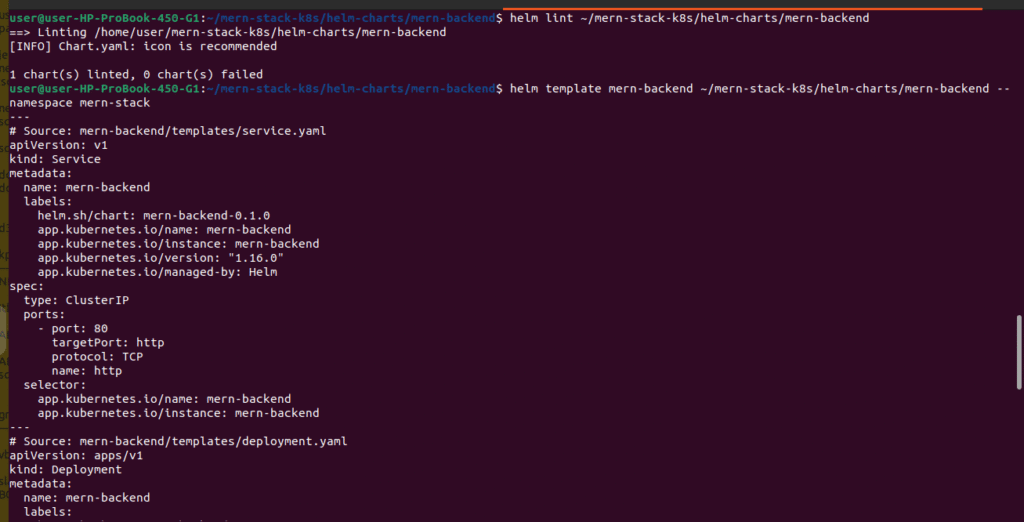
Step 8: Deploy MERN backend Application Using Helm
The moment we’ve been waiting for! Let’s deploy our application.
# Install backend using Helm
helm install mern-backend   ~/mern-stack-k8s/helm-charts/mern-backend   --namespace mern-stack -f dev-values.yaml

# Check deployment status
kubectl get pods -n mern-stack -l app.kubernetes.io/name=mern-backend

# Watch pods come up
kubectl get pods -n mern-stack -l app.kubernetes.io/name=mern-backend -w

# Check logs
kubectl logs -n mern-stack -l app.kubernetes.io/name=mern-backend --tail=50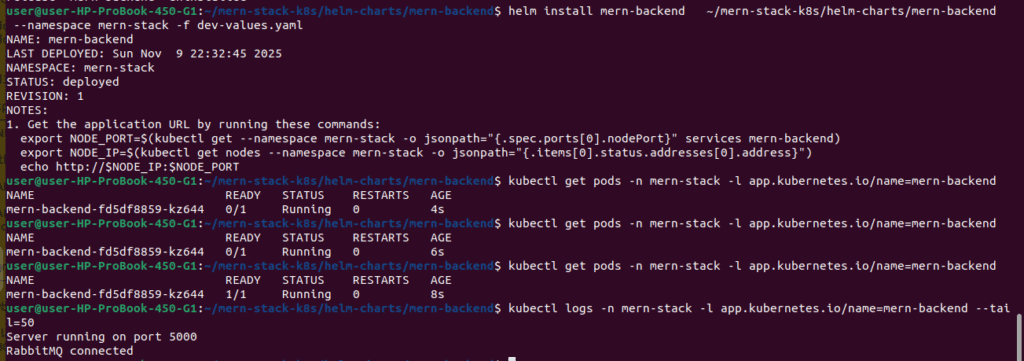
# Port forward to backend
kubectl port-forward -n mern-stack svc/mern-backend 5000:5000 &


# Test API endpoint
curl http://localhost:5000/api/products

# Stop port forward
killall kubectl
Deploy frontend application using helm
# Create frontend chart
helm create mern-frontend
Configure Frontend Helm Chart:
cd /mern-stack-k8s/helm-charts/mern-frontend
create dev-values.yaml

image:
  repository: 446440614855.dkr.ecr.us-east-1.amazonaws.com/mern-frontend
  tag: "v1.0.0"
  pullPolicy: IfNotPresent

# attach the pull secret
imagePullSecrets:
  - name: ecr-registry-secret

replicas: 2

service:
  type: NodePort
  port: 80
  nodePort: 32004

resources:
  requests:
    cpu: 50m
    memory: 64Mi
  limits:
    cpu: 300m
    memory: 256Mi

serviceAccount:
  create: false
  name: ""


probes:
  startup:
    enabled: true
    path: /
    initialDelaySeconds: 3
    periodSeconds: 5
    timeoutSeconds: 2
    failureThreshold: 30

  readiness:
    enabled: true
    path: /
    initialDelaySeconds: 5
    periodSeconds: 5
    timeoutSeconds: 2
    failureThreshold: 3
    successThreshold: 1

  liveness:
    enabled: true
    path: /
    initialDelaySeconds: 15
    periodSeconds: 10
    timeoutSeconds: 3
    failureThreshold: 3

autoscaling:
  enabled: false

# NEW: backend target for Nginx
backend:
  host: mern-backend   # your backend Service name
  port: 5000                      # backend Service port

# App config (what the React app uses)
env:
  BACKEND_BASE_URL: "/api"
Replace the account id ,region & ecr repo accordingly
Frontend deployment and service templates follow the same pattern as backend. Copy and adjust accordingly.
configmap.yaml
apiVersion: v1
kind: ConfigMap
metadata:
  name: {{ include "mern-frontend.fullname" . }}-config
  namespace: {{ .Release.Namespace }}
data:
  BACKEND_BASE_URL: {{ .Values.env.BACKEND_BASE_URL | quote }}
deployment.yaml:
apiVersion: apps/v1
kind: Deployment
metadata:
  name: {{ include "mern-frontend.fullname" . }}
  labels:
    {{- include "mern-frontend.labels" . | nindent 4 }}
spec:
  {{- $autoscalingEnabled := (and .Values.autoscaling (hasKey .Values.autoscaling "enabled") .Values.autoscaling.enabled) -}}
  {{- if not $autoscalingEnabled }}
  replicas: {{ .Values.replicas | default 1 }}
  {{- end }}
  selector:
    matchLabels:
      {{- include "mern-frontend.selectorLabels" . | nindent 6 }}
  template:
    metadata:
      {{- with .Values.podAnnotations }}
      annotations:
        {{- toYaml . | nindent 8 }}
      {{- end }}
      labels:
        {{- include "mern-frontend.labels" . | nindent 8 }}
        {{- with .Values.podLabels }}
        {{- toYaml . | nindent 8 }}
        {{- end }}
    spec:
      {{- with .Values.imagePullSecrets }}
      imagePullSecrets:
        {{- toYaml . | nindent 8 }}
      {{- end }}
      serviceAccountName: {{ include "mern-frontend.serviceAccountName" . }}
      {{- with .Values.podSecurityContext }}
      securityContext:
        {{- toYaml . | nindent 8 }}
      {{- end }}
      containers:
        - name: {{ .Chart.Name }}
          {{- with .Values.securityContext }}
          securityContext:
            {{- toYaml . | nindent 12 }}
          {{- end }}
          image: "{{ .Values.image.repository }}:{{ .Values.image.tag | default .Chart.AppVersion }}"
          imagePullPolicy: {{ .Values.image.pullPolicy | default "IfNotPresent" }}
          ports:
            - name: http
              containerPort: {{ .Values.service.port | default 80 }}
              protocol: TCP
          {{- with .Values.resources }}
          resources:
            {{- toYaml . | nindent 12 }}
          {{- end }}
          {{- if .Values.env }}
          env:
            {{- if hasKey .Values.env "BACKEND_BASE_URL" }}
            - name: BACKEND_BASE_URL
              valueFrom:
                configMapKeyRef:
                  name: {{ include "mern-frontend.fullname" . }}-config
                  key: BACKEND_BASE_URL
            {{- end }}
          {{- end }}
          {{- if and .Values.probes .Values.probes.startup .Values.probes.startup.enabled }}
          startupProbe:
            httpGet:
              path: {{ .Values.probes.startup.path }}
              port: {{ .Values.service.port }}
            initialDelaySeconds: {{ .Values.probes.startup.initialDelaySeconds | default 3 }}
            periodSeconds: {{ .Values.probes.startup.periodSeconds | default 5 }}
            timeoutSeconds: {{ .Values.probes.startup.timeoutSeconds | default 2 }}
            failureThreshold: {{ .Values.probes.startup.failureThreshold | default 30 }}
          {{- end }}

          {{- if and .Values.probes .Values.probes.readiness .Values.probes.readiness.enabled }}
          readinessProbe:
            httpGet:
              path: {{ .Values.probes.readiness.path }}
              port: {{ .Values.service.port }}
            initialDelaySeconds: {{ .Values.probes.readiness.initialDelaySeconds | default 5 }}
            periodSeconds: {{ .Values.probes.readiness.periodSeconds | default 5 }}
            timeoutSeconds: {{ .Values.probes.readiness.timeoutSeconds | default 2 }}
            failureThreshold: {{ .Values.probes.readiness.failureThreshold | default 3 }}
            successThreshold: {{ .Values.probes.readiness.successThreshold | default 1 }}
          {{- end }}

          {{- if and .Values.probes .Values.probes.liveness .Values.probes.liveness.enabled }}
          livenessProbe:
            httpGet:
              path: {{ .Values.probes.liveness.path }}
              port: {{ .Values.service.port }}
            initialDelaySeconds: {{ .Values.probes.liveness.initialDelaySeconds | default 15 }}
            periodSeconds: {{ .Values.probes.liveness.periodSeconds | default 10 }}
            timeoutSeconds: {{ .Values.probes.liveness.timeoutSeconds | default 3 }}
            failureThreshold: {{ .Values.probes.liveness.failureThreshold | default 3 }}
          {{- end }}

          # Mount Nginx default.conf from ConfigMap
          volumeMounts:
            - name: nginx-conf
              mountPath: /etc/nginx/conf.d/default.conf
              subPath: default.conf
              readOnly: true
            {{- with .Values.volumeMounts }}
            {{- toYaml . | nindent 12 }}
            {{- end }}
      # Volumes: include nginx-conf ConfigMap + any user-defined volumes
      volumes:
        - name: nginx-conf
          configMap:
            name: {{ include "mern-frontend.fullname" . }}-nginx
            items:
              - key: default.conf
                path: default.conf
        {{- with .Values.volumes }}
        {{- toYaml . | nindent 8 }}
        {{- end }}
      {{- with .Values.nodeSelector }}
      nodeSelector:
        {{- toYaml . | nindent 8 }}
      {{- end }}
      {{- with .Values.affinity }}
      affinity:
        {{- toYaml . | nindent 8 }}
      {{- end }}
      {{- with .Values.tolerations }}
      tolerations:
        {{- toYaml . | nindent 8 }}
      {{- end }}
nginx-configmap.yaml
apiVersion: v1
kind: ConfigMap
metadata:
  name: {{ include "mern-frontend.fullname" . }}-nginx
  labels:
    {{- include "mern-frontend.labels" . | nindent 4 }}
data:
  default.conf: |
    upstream backend_upstream {
      server {{ .Values.backend.host }}:{{ .Values.backend.port }};
    }

    server {
      listen 80;

      location / {
        root /usr/share/nginx/html;
        index index.html index.htm;
        try_files $uri $uri/ /index.html;
      }

      # Proxy /api -> backend
      location /api/ {
        proxy_pass http://backend_upstream;
        proxy_http_version 1.1;
        proxy_set_header Connection "";
        proxy_set_header Host $host;
        proxy_set_header X-Real-IP $remote_addr;
        proxy_set_header X-Forwarded-For $proxy_add_x_forwarded_for;
        proxy_set_header X-Forwarded-Proto $scheme;
      }
    }
service.yaml:
apiVersion: v1
kind: Service
metadata:
  name: {{ include "mern-frontend.fullname" . }}
  labels:
    {{- include "mern-frontend.labels" . | nindent 4 }}
spec:
  type: {{ .Values.service.type }}
  ports:
    - port: {{ .Values.service.port }}
      targetPort: http
      protocol: TCP
      name: http
  selector:
    {{- include "mern-frontend.selectorLabels" . | nindent 4 }}
Deploy Frontend:
# Install frontend using Helm
helm install mern-frontend \
  ~/mern-stack-k8s/helm-charts/mern-frontend \
  --namespace mern-stack -f dev-values.yaml
# Check deployment status
kubectl get pods -n mern-stack -l app.kubernetes.io/name=mern-frontend

# Watch pods come up
kubectl get pods -n mern-stack -l app.kubernetes.io/name=mern-frontend -w

Acces the frontend application from the browser

http://172.18.0.2:31965/login
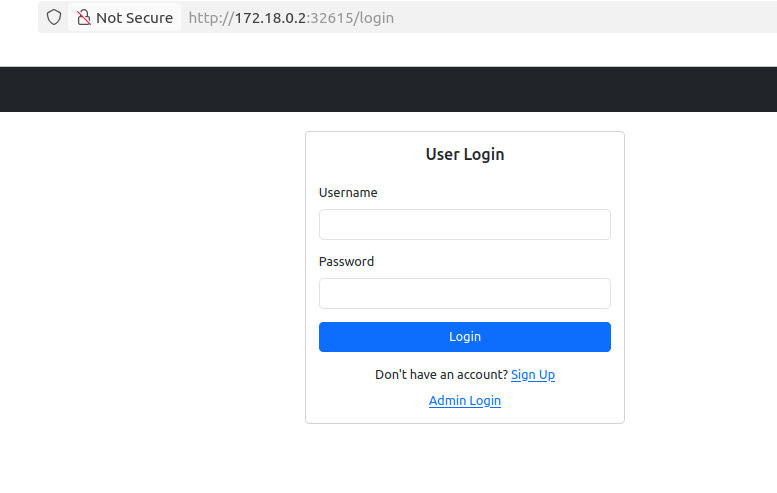
test the signup by creating a user & giving details
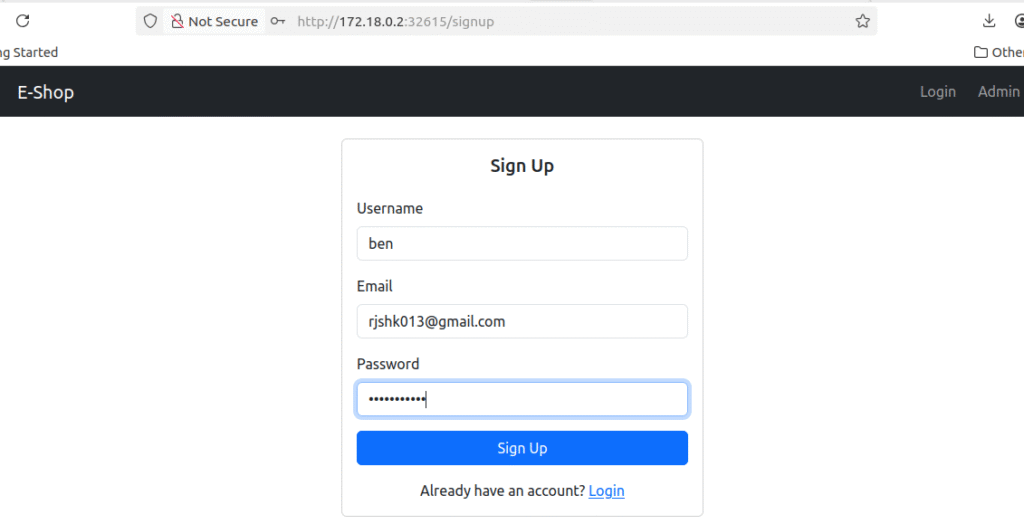
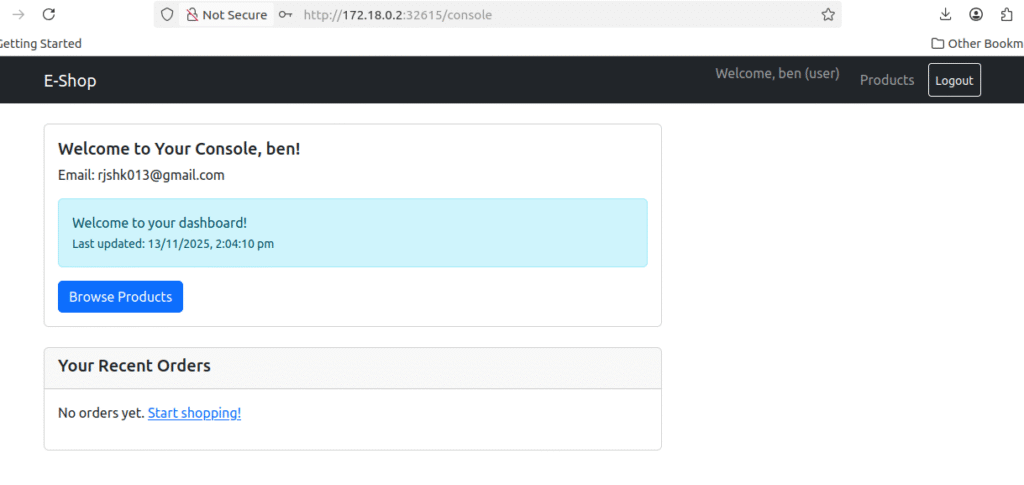
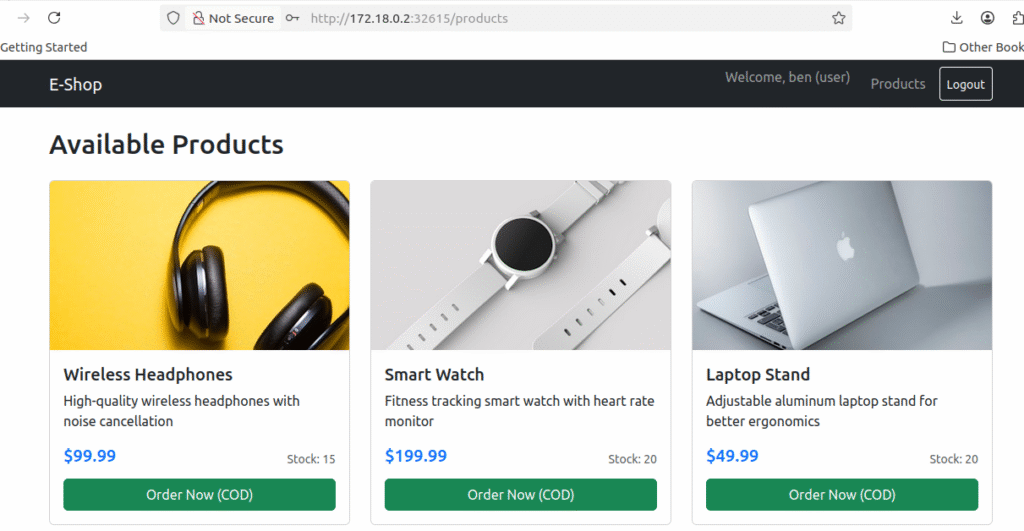
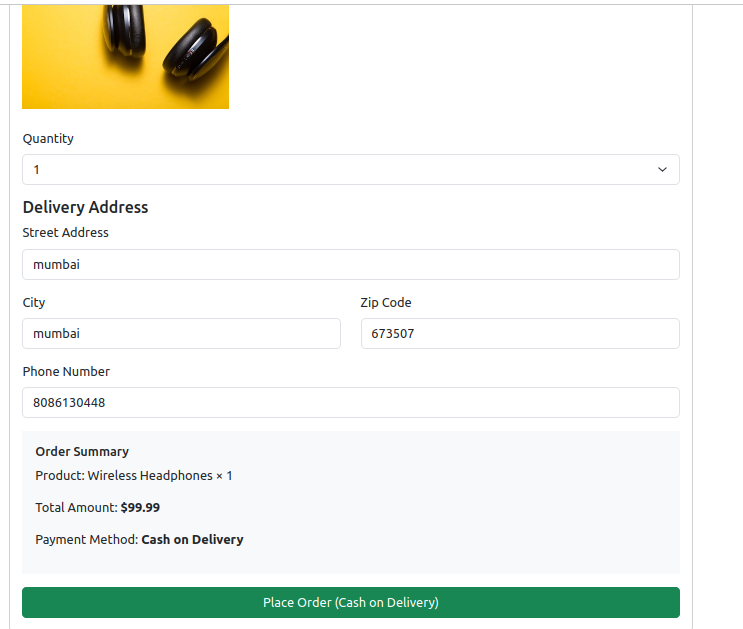
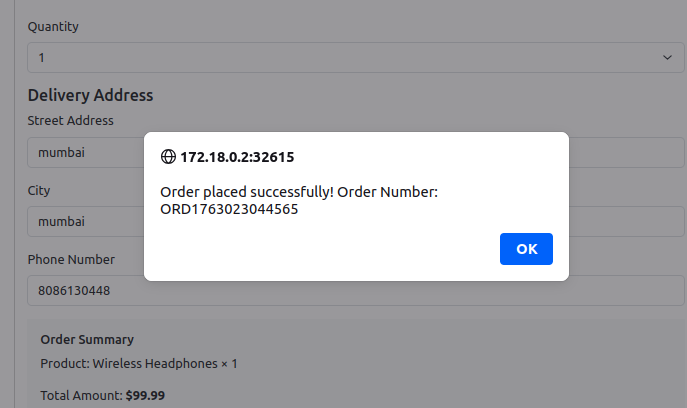
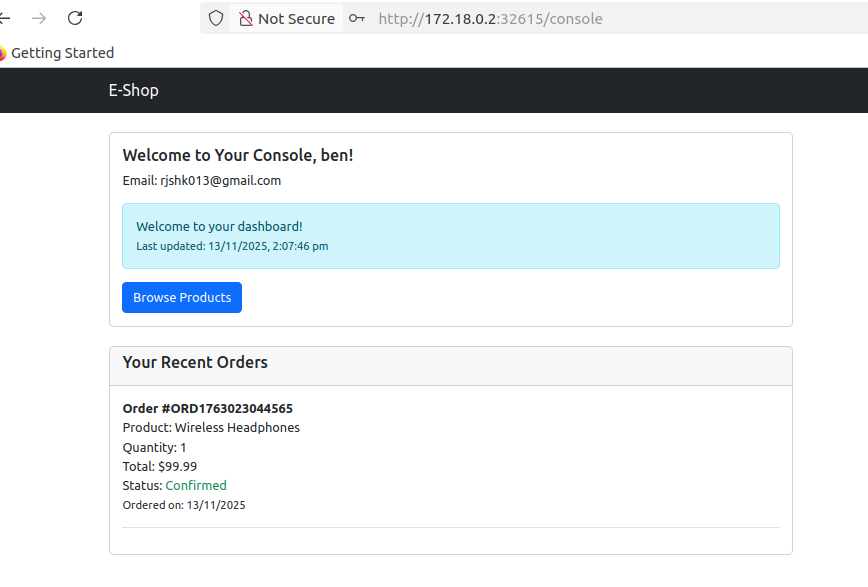
Check your mail whether you have received the order confirmation
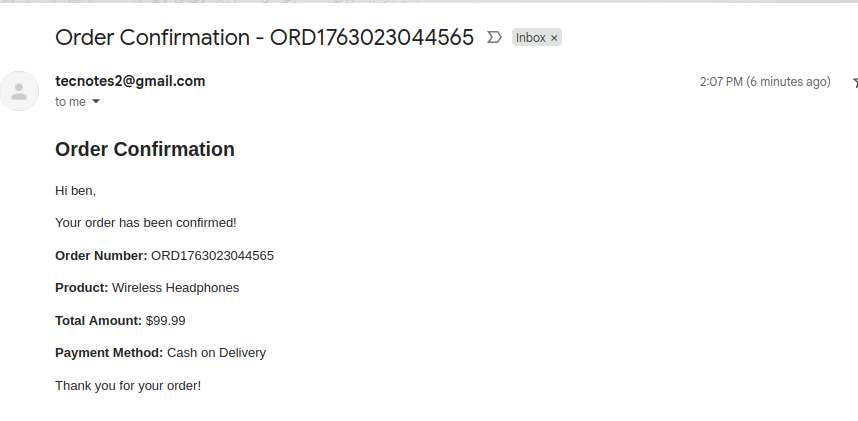
Congratulations! Your MERN stack is now running on Kubernetes! 🎉
You can find the the used helm charts in the repo
git clone https://github.com/rjshk013/cldop-projecthub.git

cd cldop-projecthub/ecommerce-app/helm-charts

ls -lrt

mern-backend
mern-frontend
Best Practices Summary
Throughout this deployment, we followed several best practices:
Security:
- ✅ Secrets stored in AWS Secrets Manager, not in code
- ✅ Private container images in ECR
- ✅ Kubernetes secrets for sensitive data
- ✅ Non-root containers in Dockerfiles
- ✅ Network isolation using namespaces
Reliability:
- ✅ Multiple replicas for high availability
- ✅ Health checks (liveness and readiness probes)
- ✅ Resource limits to prevent resource exhaustion
- ✅ Persistent storage for databases
- ✅ StatefulSets for stateful services
Maintainability:
- ✅ Helm charts for reproducible deployments
- ✅ Version-tagged images
- ✅ GitOps-ready structure
- ✅ Clear separation of concerns
- ✅ Comprehensive logging
Conclusion
Congratulations! You’ve successfully deployed a production-grade MERN stack application on a local Kubernetes cluster while leveraging AWS cloud services. This is exactly how modern DevOps teams work in real-world scenarios.
Skills You’ve Gained
You now have hands-on experience with:
- AWS ECR for container image management
- AWS Secrets Manager for secure configuration
- Kubernetes Deployments, Services, and Secrets
- Helm charts for application packaging
- StatefulSets for database workloads
- Container orchestration best practices
- Hybrid cloud-native architectures
- DevOps workflows used by leading companies
You’re now running:
- Frontend: React app (2 replicas) serving the UI
- Backend: Node.js/Express API (2 replicas) handling business logic
- MongoDB: Persistent database with 5Gi storage
- Redis: In-memory cache for sessions
- RabbitMQ: Message queue for async email processing
- All connected, monitored, and production-ready!