How to Optimize AWS NAT Gateway Costs
 rjshk013
December 26, 2025
rjshk013
December 26, 2025
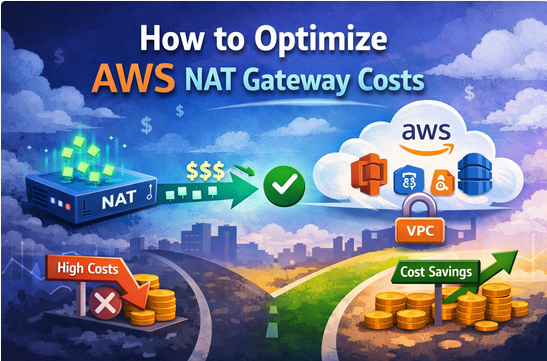
How to Optimize AWS NAT Gateway Costs
Practical Strategies for EKS & Private Subnet Workloads
AWS NAT Gateway is one of the most commonly overlooked cost centers in AWS — especially when running EKS, private node groups, and RDS in private subnets.
NAT costs grow silently because they are driven by:
- Hourly NAT charges
- Per-GB data processing fees
- Architectural defaults that scale cost faster than traffic
This article explains why NAT costs spike, how to reduce them, and how AWS’s new Regional NAT Gateway changes the game.
Why NAT Gateway Costs Spike
NAT Gateway charges you for:
- Every hour the gateway exists
- Every GB of data processed, regardless of destination
In EKS environments, NAT is commonly used for:
- Pulling images from ECR
- STS calls (IRSA / Pod Identity)
- CloudWatch logs
- Secrets Manager
- SQS / SNS
- External API calls
Most teams don’t realize how much of this traffic never needed NAT in the first place.
What You’re Really Paying For
A classic setup looks like this:
- 1 NAT Gateway per Availability Zone
- Private subnets route
0.0.0.0/0→ NAT - Even low-traffic AZs still incur full hourly cost
Result:
- High baseline spend
- NATs sitting idle but still billing
- Dev & staging environments paying prod-level network costs
Core NAT Cost Optimization Strategies
1️⃣ Use VPC Endpoints to Bypass NAT (Highest ROI)
Most NAT traffic is actually AWS service traffic, not “internet” traffic.
Use:
- Gateway endpoints (FREE)
- S3
- DynamoDB
- Interface endpoints (PrivateLink)
- ECR (api + dkr)
- STS
- Secrets Manager
- CloudWatch Logs
- SQS / SNS
- API Gateway (private APIs)
Once endpoints are in place:
- Traffic stays inside AWS
- NAT data processing drops sharply
- Security improves automatically
This alone often reduces NAT costs by 40–70%.
2️⃣ Reduce Unnecessary Egress Through NAT
Common NAT abusers:
- Repeated external API calls
- Public image registries
- OS package updates
- Large downloads during startup
Optimizations:
- Cache artifacts in S3
- Use ECR instead of public registries
- Batch external calls
- Avoid cross-AZ NAT routing
Less data → less NAT cost.
3️⃣ Right-Size NAT for the Environment
Not every environment needs:
- Multi-AZ NAT
- Full HA
- Always-on NAT capacity
For:
- Dev / test
- Staging
- Internal tools
You can safely optimize availability assumptions to reduce spend.
🆕 New Update: AWS Regional NAT Gateway
This is a major shift in AWS networking economics.
The Old Model (Per-AZ NAT)
- One NAT Gateway per AZ
- High hourly cost multiplied by AZ count
- Recommended mainly for availability, not efficiency
The New Model (Regional NAT Gateway)
- Single NAT Gateway per VPC (region-wide)
- Serves private subnets across all AZs
- Eliminates the need to deploy NAT in every AZ
Why This Matters
- Cuts NAT hourly cost by ~60–70%
- Simplifies routing
- Ideal for EKS workloads already using VPC endpoints
Trade-Off to Understand
- Traffic from other AZs may incur cross-AZ data transfer
- Still usually cheaper than running multiple idle NATs
- For ultra-critical workloads, per-AZ NAT may still make sense
Best-Practice Pattern (Modern EKS Setup)
The most cost-efficient architecture today:
- ✅ VPC endpoints for all AWS services
- ✅ Regional NAT Gateway for true internet traffic
- ✅ Per-AZ NAT only when strict AZ isolation is required
This keeps NAT usage minimal, intentional, and predictable.
Monitoring & Validation
To ensure savings:
- Track NAT Gateway data processing in Cost Explorer
- Use VPC Flow Logs to identify NAT-heavy sources
- Compare pre/post endpoint rollout traffic
- Validate cross-AZ charges vs NAT hourly savings
Final Takeaway
AWS didn’t reduce NAT pricing.
They gave you architectural flexibility.
If you’re still running:
- One NAT per AZ
- No VPC endpoints
- Private EKS clusters with heavy AWS API usage
You’re almost certainly overpaying.
Modern NAT cost optimization is about:
- Avoiding NAT, not scaling it
- Using endpoints first
- Choosing regional vs per-AZ NAT intentionally
Small networking changes now have big FinOps impact later.